
Connect Your ToolsSimplify Your Workflows
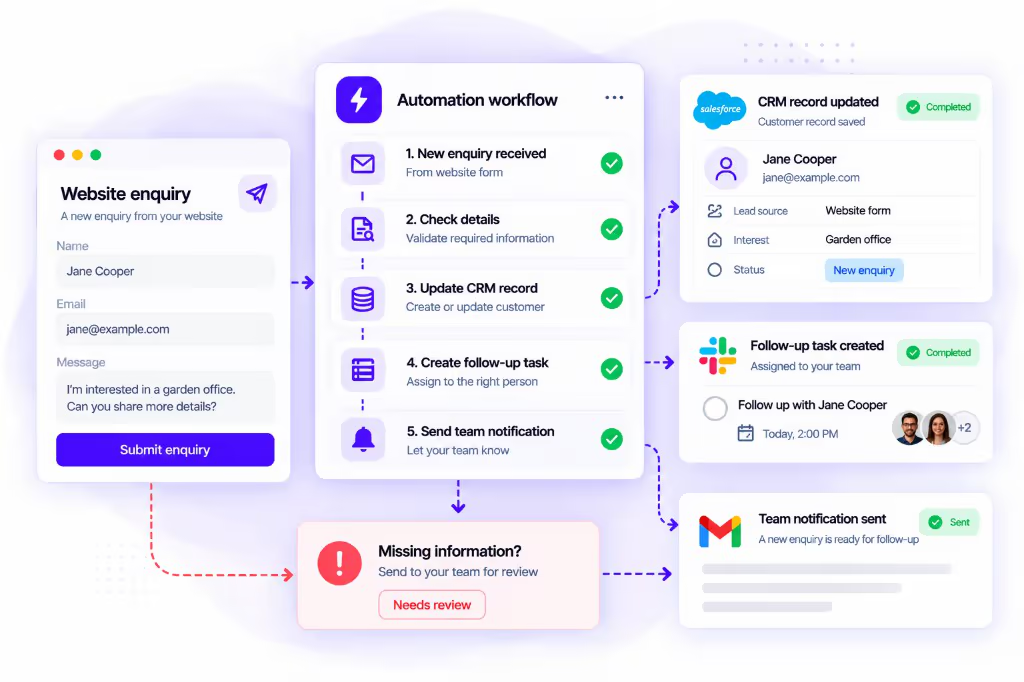
We connect your business tools to move information, create tasks and send updates. We agree which steps should run automatically and which need your team.
About this service
What we do
We connect your business tools to move information, create tasks and send updates. We agree which steps run automatically and which still need your team.
Who it helps
Teams that repeatedly move enquiries, customer records, orders or reports between tools by hand and want fewer missed follow-ups.
What you receive
You receive a tested workflow for the agreed steps, connected tools listed in the proposal, failure handling rules, and handover notes for checks after launch.
What's included in this service
A plan for the steps
We review how the work is done today and plan which steps to automate.
Tool connections and rules
We connect the agreed tools and set up when each step starts and what information it uses.
Tests before launch
We test everyday tasks, missing details and cases that need help from your team.
Launch and team guidance
We launch the workflow and explain how your team can check it and get help.
Send enquiries to the right person
Collect enquiry details from your website or other tools and send them to the person who handles them.
Set up new customers
Create a customer record and start the tasks your team needs when a new customer joins.
Pass orders to your team
Send order details to the right team and create the tasks needed to process them.
Update details across tools
When details change in one tool, update the matching details in another.
Send reminders and request approval
Remind people about tasks and move to the next step when approval is given.
How your project moves forward
We check your tools and process before confirming which steps can be automated.
Review the process
Show us the steps, tools and problems in the work you want to automate.
Build the workflow
We connect the tools and set up the agreed steps and checks.
Test it with your team
Your team checks the results, including missing details and failed steps.
Launch and hand over
We launch the workflow and explain how to check it and get support.
Why choose us
Check required details
We check that needed details are present before changing your records.
Handle repeat requests
We agree how to find existing records and what to do if the same request arrives twice.
Escalate what needs help
We agree which problems should be recorded and when your team should be told.
Compare before and after
We record how the work is done today and agree what to compare after launch.
Frequently asked questions
Which tools can you connect?
We start from the tools you already use, for example forms, CRMs, email, spreadsheets, project trackers or ecommerce platforms. We check account plans, available connections and access before confirming what can be automated.
What happens if a connection or step fails?
We agree how failures are recorded, who is notified and whether a step can retry or must stop for review. Missing fields, duplicate submissions and tool outages are tested before launch where possible.
Does the workflow need AI?
Not always. Many tasks can follow set rules without AI. We consider AI when a step needs to interpret something such as a customer message or document.
How do you avoid creating the same record twice?
We agree which details identify an existing record and test repeat submissions before launch. The workflow then follows the rules set for that record.
Can our team update the workflow?
This depends on the tools and the changes needed. Before launch, we explain what your team can edit, what access is needed and what training or support is included.
What affects the cost after launch?
Software plans, how often the workflow runs, the tools involved and ongoing support can affect the cost. Your proposal explains these costs before work starts.